Getting Your Nonprofit Seen Online: Google Ad Grant Tips


Online fundraising is the new normal for nonprofits and other organizations seeking to earn donations. While the internet provides access to approximately 5.3 billion users, online spaces are also busy spaces, and standing out requires thought, strategy, and the right tools.
When marketing your nonprofit online, consider not just the message you want to send to potential supporters but how you are sending it. The channels you use to communicate with donors shape your message and determine who your audience will be.
One channel with massive reach and free entry to nonprofits is Google Ads. Through the Google Ad Grant, nonprofits can promote themselves on the world’s most popular search engine.
However, just like with any platform, your nonprofit has competition for Google Ads. To help you stand out and stay ahead of the curve, we’ll explore the basics of the Google Ad Grant and encourage you to use this as your jumping-off point into the latest advancements in digital marketing.
What is the Google Ad Grant?
The Google Ad Grant is a corporate philanthropy program through which Google provides nonprofits with $10,000 of free advertising credits for their platform each month. This means participating nonprofits can run ads that appear at the top of Google search results for their target keywords for free. These ads can promote anything that advances your mission, from fundraising campaigns and events to program offerings.
However, not every nonprofit is eligible for the Google Ad Grants program. Applicants must be registered 501(c)(3) organizations, so individuals running fundraisers without a nonprofit’s backing are ineligible. Additionally, government entities, hospitals and healthcare organizations, and educational institutions can’t participate.
If you meet these criteria, your first step is registering for Google for Nonprofits. Even if you choose not to pursue the Google Ad Grant later, this program offers a number of useful free tools, such as:
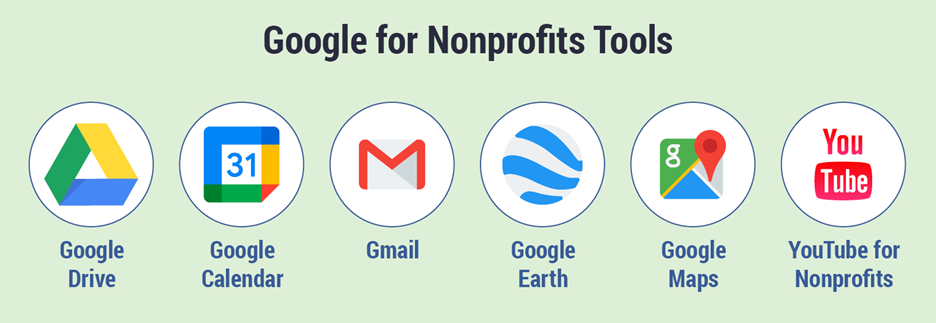
- Google Workspace, including Gmail, Drive, and Calendar
- Google Earth and Maps
- YouTube for Nonprofits
When creating your digital marketing strategy, consider how you can leverage all of Google’s free resources that the Google Ad Grant provides. This will help you plan, launch, and track more successful campaigns.
Have a specific goal for each Google Ad.
When someone sees one of your ads, what action do you want them to take? Should they donate, volunteer, sign up for one of your programs, or simply spread awareness of your target issue?
Having target goals in mind will help you better manage your ads’ success. After all, you can compare how many individuals took your target action before and after launching your ad campaign.
Additionally, Google Ad Grant accounts allow users to choose specific goals for their ads. Nonprofits are encouraged to run multiple ad campaigns, which empowers you to group ads targeting similar keywords together.
For example, say you have two main goals: drive traffic to your membership program page and spread awareness about your nonprofit’s mission. You would create two Google Ad campaigns, one focusing on donation keywords and the other on educational keywords.
Target strategic keywords.
Google Ads are based on keywords, which are the words and phrases users input into Google when conducting a search. The value of a keyword depends on its average traffic, the type of audience searching for it, and its relevance to your ads’ goals.
To help you choose keywords for promoting your next fundraiser, take these considerations into account:
Keyword Types
In your Google Ad Grants account, you can set what types of keywords your ads should appear for. Doing so helps control who your audience is and use your allotted ad credits strategically.
Here’s a breakdown of Google keyword types:
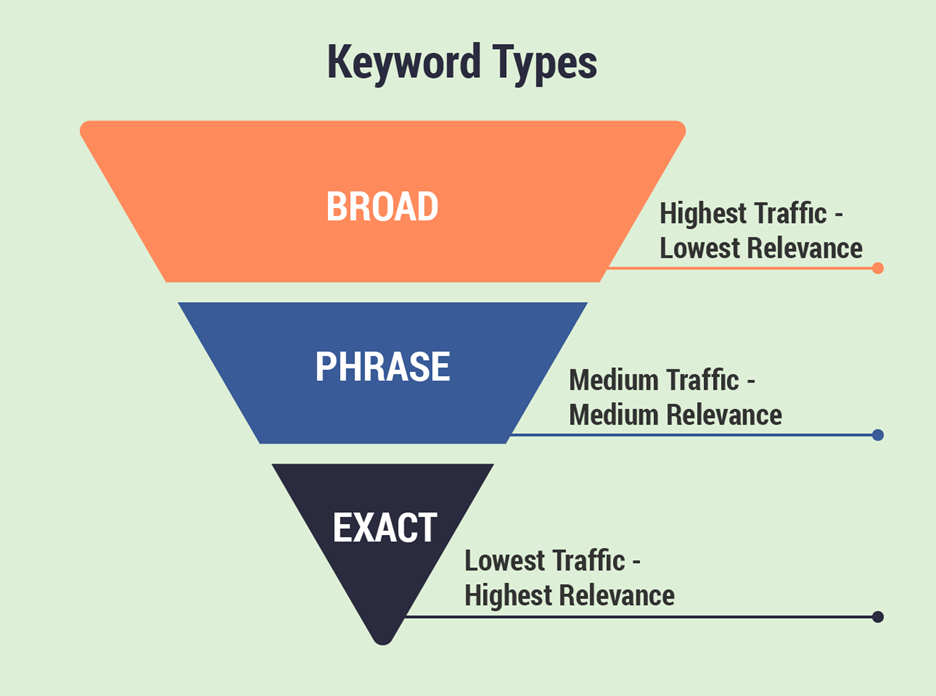
- Broad matches use Google’s understanding of similar keywords to yours to show your ad to individuals searching terms related to yours. For instance, a keyword like “continuing education courses” might have broad matches like “GED classes” and “adult education programs.”
- Broad matches will generate high traffic for your ads, but lead quality may vary. Phrase matches include your keyword, as well as words directly surrounding it. For example, if a nonprofit arts organization has “art classes” as a keyword, individuals searching “adult art classes” and “singing and art classes” may be shown the nonprofit’s ad.
- Exact matches allow only searches that match your keyword exactly with no extra words or synonyms in place of words. This will provide the lowest traffic, but the results you get will likely be high-quality leads.
Additionally, consider negative keywords. These are words you want to exclude your ads from appearing for. This helps narrow your audience and ensure your ads are shown to individuals likely to be interested in your cause. For instance, for the keyword “donate,” you might make “blood” a negative keyword to filter out individuals looking for blood drives.
Google Requirements
Google has multiple regulations in place to ensure its users are shown ads that are relevant to their searches and feature valuable content. Some of these rules may seem restrictive, but remember, Google’s quality standards ensure their audience trusts search ads, leading to more clicks on your nonprofit’s ads.
When it comes to keywords specifically, here are a few rules to keep in mind:
- No single-word keywords. To push Google Ad Grant recipients to target specific keywords, Google prohibits the use of single-word keywords with some exceptions. For instance, brand names, specific medical terminology, and basic keywords related to nonprofits like “donate” and “volunteer” are allowed.
- No overly generic keywords. Your keywords should be indicative of your content. For instance, keywords like “videos” and “news” would be considered too vague. In general, as long as you abide by the “no single-word keywords” rule, you should have little issue following this rule as well.
- All keywords must have a Quality Score of 3 or higher. Google measures the quality of each of your ads via its Quality Score system. Quality Score is a 1-10 scale and is calculated by considering each ad’s expected click-through rate, relevance to its audience, and the landing page experience. If one of your ads falls to a Quality Score of 1 or 2, suspend it and consider what you can do to improve its quality.
Google has other regulations related to the Google Ad Grant to be aware of, such as the number of ads you’re required to run on your account. Most information about various rules can be found through the Google Ad Help page.
If you’re still having trouble following Google’s requirements or can’t find the information you need, consider partnering with a consulting service that specializes in the Google Ad Grant.
User Intent
Think about what pages on your website you want to drive traffic to and what content visitors are looking for. Google Ads are primarily useful for attracting new supporters, so most of your audience will be unfamiliar with your cause when they first click on one of your ads. As such, while some visitors may use Google specifically to search for nonprofits to donate to, most visitors will need a bit more information before making a financial contribution.
For example, a summer camp might create an ad for its donation page. Would this page be more effective if it were just the donation form with little other information? Or, would a donation page that explains camp programs, shares how donations are used, and features pictures of campers be more useful to these new visitors?
For most visitors, the second option is better. But what does this mean for keywords?
When researching keywords, ensure the landing pages you intend to use for your ads meet user expectations. The easiest way to do this is to enter your prospective keywords into Google and check out the top results. Look at both the ads and organic results (non-paid results that appear under Google Ads). Assess the user intent for these pages by asking yourself the following questions:
- Is the content promotional or educational?
- How much does the page assume the audience knows about this topic?
- What length is the page?
- Is the page just text, or does it include multimedia content?
Then, consider these questions for your landing pages. If you generally have the same answers, your page likely fits the intent of the keyword. If not, consider a new keyword or how you can adjust your landing page to meet user expectations.
Create high-quality ads.
Like marketing on any platform, the higher the quality of your ads, the more clicks they’ll get. After choosing your keywords, consider what type of ad will attract the right audience. Google gives you only a few elements to optimize, which are:
- Ad copy. Your ads’ page title and meta description make up their copy. Experience writing copy for other types of campaigns can be useful here, but remember to keep it short and to the point to avoid getting cut off by Google’s character limits. Try writing several different potential ad headlines and descriptions to experiment with what attracts the most visitors.
- Landing pages. We’ve already touched on your landing page’s content, but also consider their user experience. These pages should load quickly, have consistent branding with the rest of your site, be easy to navigate, and feature clear calls to action. Additionally, make sure the rest of your site is up to these standards. After all, a visitor who likes what they see on your landing page will continue their donor journey by exploring the rest of your site.
- Sitelinks. If your ad takes up more space on Google’s search results page, you’ll get more eyes on it. Sitelink ad extensions are a tool Google offers that allows you to expand your ads by featuring links to other pages on your site and providing more details about your website to entice visitors.

Your Google Ad Grant account can help you experiment to create the best ads possible with responsive search ads, which let you enter multiple ad headlines and descriptions. Google will then test different combinations to learn what performs best, so you can capture new audiences and drive action.
Consider working with a Google Ad Grants agency.
If your nonprofit needs help applying for the Google Ad Grants program or managing your account, consider working with a consulting agency that specializes in the Google Ad Grant. These agencies provide a variety of services, including:
- Application assistance. The Google Ad Grant application process is straightforward but requires some preparation. Your consultant can answer your questions, fill out your program application, and provide suggestions for preparing your website for Google’s review.
- Keyword research. Google Ad Grant agencies have access to keyword research tools and experience identifying and targeting keywords. Meet with your Ad Grant agent to discuss your nonprofit’s goals and brainstorm keywords you should target. Then, they’ll take care of the research and help you decide which keywords to target.
- Account management. Creating new ads, tracking results, and keeping your account organized requires marketing know-how and a considerable amount of time. Nonprofits can outsource these tasks to a Google Ad Grant agent. Your agent will then provide updates on your account and advice on improving your ad strategy.
- Account reactivation. If your account is ever suspended, a Google Ad Grant agent can assess what happened, suggest fixes, and walk you through the reactivation process. Google Ad Grant agents also prioritize staying updated on Google’s changing regulations, helping your account maintain compliance.
When researching Google Ad Grant agencies, look for consultants that are part of the Google Partners program. These agencies have been vetted by Google, meaning you can trust that their services are high-quality, aligned with Google’s standards, and reliable.
Of course, also assess your budget and needs before working with an agency. Remember, the $10,000 provided through the Google Ad Grant is for exclusive use on search ads, meaning your nonprofit will need to pay for the consultant’s services.
The Google Ad Grant allows your nonprofit to reach new audiences without spending an extra cent on marketing. Give your ads the best chance at grabbing new visitors by using strategic keywords, creating high-quality copy, and aligning with their user intent.

Jessica King is the business lead at Getting Attention, where she helps nonprofits get the Google Ad Grant and manage it effectively to get the most from it.
Prior to her work at Getting Attention, Jessica worked at nonprofits and in higher ed, where she focused on communication and digital marketing. Most recently, she worked in search engine optimization in the mission-driven sector.
Jessica holds a master's degree in communication from Virginia Tech. In her free time, she reads, cooks a new recipe, or hangs out with her cats, Benny and Olive.

Read More